
JSON well-formed checking
Published 2012-07-18
Whenever you create some JSON output and want to make sure that the generated data is really parsable you can take the XML ValidatorBuddy editor to quickly check one or many JSON files with just a few clicks.
Select the JSON documents you want to check in the built-in File Explorer window of XML ValidatorBuddy and use the “Check if JSON well-formed” command from the JSON menu.
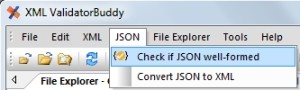
Command to check well-formed JSON
And if we have some malformed JSON to check like here:
{
“root”: {
“span”: [ { “style”: “font” }, 1, ]
}
}
we get the following error report in the editor:
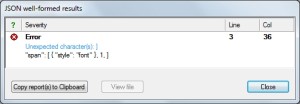
Results of JSON well-formed check
This way you can easily make sure that your JSON data is also readable by other applications and also by the JSON validator.
Take a detailed look at some other features of XML ValidatorBuddy
XML ValidatorBuddy is more than just an XML editor. Learn more on clicking the images and links below.


Editor and validator for large XML
View and edit large XML data - not limited to well-formed input
Learn more


Complete XML editor
XML editor for Windows ® with syntax-coloring, code folding and many more...
Learn more