
Integrate DITA Open Toolkit as external command
Published 2016-03-22
It is quite easy to use the DITA Open Toolkit from XML ValidatorBuddy as an external tool. The DITA standard is used to produce various output formats including HTML and PDF from XML. This usually happens with the help of Java and some ant tasks. To simplify the process the DITA Open Toolkit provides a batch task which only takes a few parameters and bundles all of the required steps.
To quickly run the DITA process to generate the output you want to a seperate folder you just need to add this batch task to the XML ValidatorBuddy editor as an external tool:
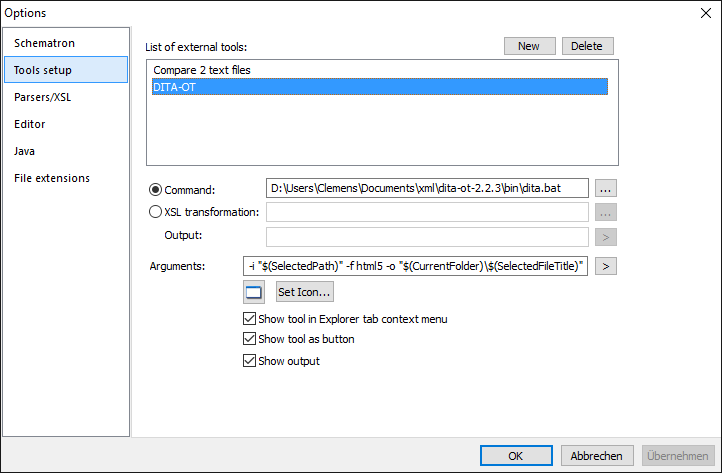
DITA-OT as external tool
Here is the input for the “Arguments” field to copy-paste it:
-i “$(SelectedPath)” -f html5 -o “$(CurrentFolder)\$(SelectedFileTitle)”
You can download and learn more about the DITA Open Toolkit here.
Take a detailed look at some other features of XML ValidatorBuddy
XML ValidatorBuddy is more than just an XML editor. Learn more on clicking the images and links below.


Editor and validator for large XML
View and edit large XML data - not limited to well-formed input
Learn more


Complete XML editor
XML editor for Windows ® with syntax-coloring, code folding and many more...
Learn more