
Generate sample data from JSON schema
Published 2017-12-14
tl;dr Use JSONBuddy or XML ValidatorBuddy to generate a live preview of JSON sample data while editing your JSON schema.
JSONBuddy has already some powerful features to support you in creating JSON schema documents.
- You can check your JSON schema at any time for syntax errors.
- You can validate your JSON schema to see if your schema can be parsed and used to validate JSON data.
- The full text of the JSON schema specification is available directly in JSONBuddy (and XML ValidatorBuddy) for any keyword.
- Entry-helpers, auto-completion and syntax-coloring on editing the schema.
Starting with JSONBuddy 4.3, you get a new powerful functionality that helps you understanding any JSON schema more quickly and saves time while you are creating or modifying your JSON schema documents.
Live preview of JSON sample data from JSON schema
Whenever you open a JSON schema, the editor will immediately start to generate a live preview of JSON sample data matching the current schema definitions. This sample data is then shown in the Preview pane.
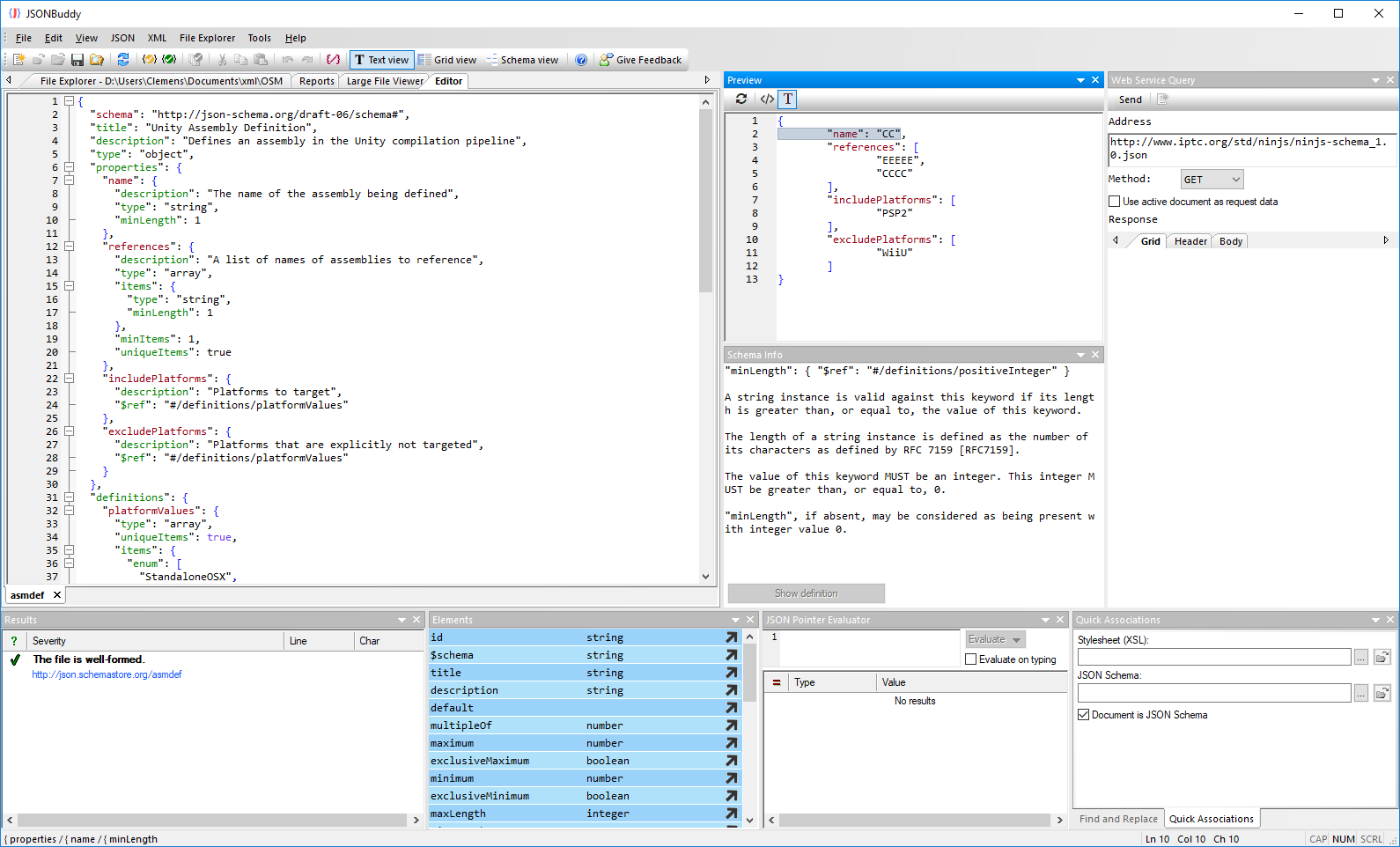
Generated JSON sample data
You can see the generated JSON data with the section highlighted, which is related to the schema part currently selected in the editor window on the left side. The sample data is automatically updated in the background if the schema is modified.
You can also create a new document with the current JSON sample data with the “JSON | Generate sample document from JSON schema” command. The schema is also already assigned to the new JSON instance.
You can see this also live in action in the following short video clip:
Take a detailed look at some other features of XML ValidatorBuddy
XML ValidatorBuddy is more than just an XML editor. Learn more on clicking the images and links below.


Editor and validator for large XML
View and edit large XML data - not limited to well-formed input
Learn more


Complete XML editor
XML editor for Windows ® with syntax-coloring, code folding and many more...
Learn more